I built and deployed CollegeROI.app in about 2.5 working days (~20hrs) using coding assistants. This project served two purposes: to experiment with the evolving landscape of AI software development, and to address the increasingly relevant question of college ROI.
First some context
College costs in the US can cause serious sticker shock. To navigate these trade-offs, I built a Google Sheets model to compare options. I found that while tuitions are often similar, starting salaries—and thus true value—can vary significantly.
What was built
I had long planned to convert my Google Sheet into a webapp but lacked the time. However, the rise of AI coding assistants made this the perfect experiment. I chose Google Gemini Pro 3 Preview primarily because it came free with my Pixel phone; otherwise, I would have opted for Claude Code.
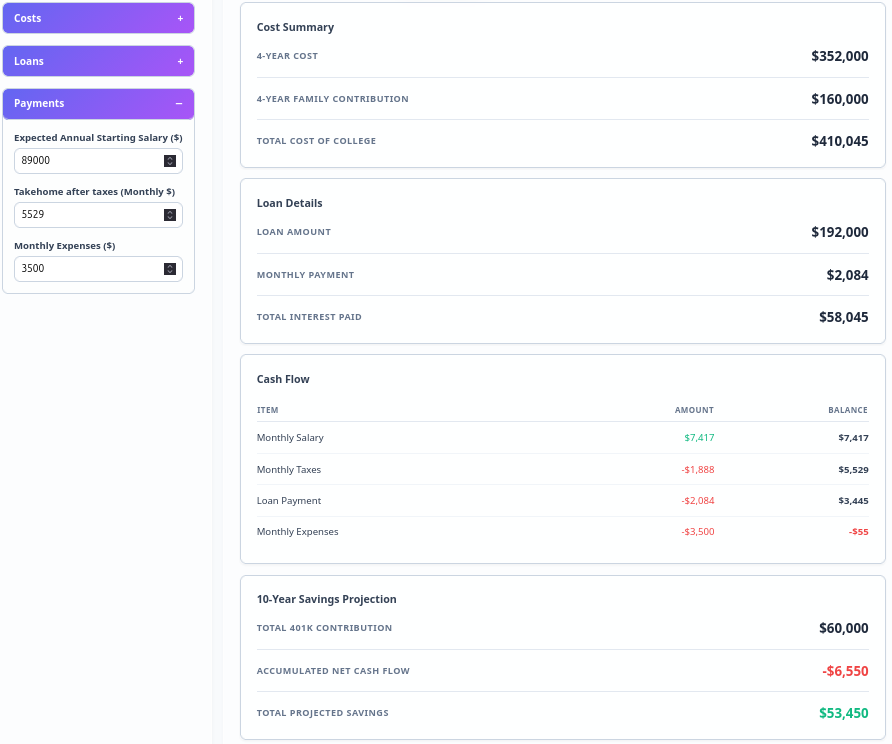
Although I have extensive coding experience, I have minimal/no experience writing in Typescript or with React. Aside from minor text tweaks, the HTML and React code were generated entirely by Gemini. Below is a subset of the most interesting prompts; you can view the full list here.
Unexpectedly Successful Prompts
Listed below are prompts that really surprised me - not just because they worked but also in some instances - that they worked despite how vague the instructions were. Each prompt has some additional context if relevant.
✨ - marks prompts that were suggested by Gemini, comments on the prompt are in italics
- Setup a project folder for a React single page application using “Vite”. Also setup the dependencies as needed for the project - I was really surprised this worked at all, with most prior projects with a new language or framework, this step often takes a lot of troubleshooting and can be very frustrating to solve.
- Redesign the homepage to show the attached screenshot on the right and put the content from the “For Students” and “For Guardians” cards into different elements on the left of the page - The resulting design required very little rework
- Help make the ROI or Total Projected savings more prominent on the page when the user is entering data in the inputs column - Surprised that Gemini’s solution was a floating metrics bar with highlighted text
- Consolidate the “Show instructions” and “Show floating metrics” controls into a single set of controls - Gemini did pretty well despite the relatively ambiguous instruction
- For the “Tuition Breakdown” modal - I was not expecting Gemini to adjust the functions as needed:
- Rename the modal to “4-Year Cost Breakdown”
- Split the row for each year into 2 columns - the first for Tuition + Other Costs, the second for Room + Board
- Adjust the summation functions accordingly
- Implement a feature to apply an inflation rate when copying values to subsequent years ✨ - Was surprised that it suggested this feature, and implemented it accurately
- Add a dropdown that uses this CSV file to provide a list of Colleges. When the user selects any college from the dropdown, the College Name, Annual Tuition and Fees, Annual Room and Board and Median starting salary values for that college are used to populate the relevant input fields on the Calculate.tsx page - It not only read the csv file but also converted it into a react compatible file that could be used in the webapp
- Replace the “Auto-fill” component with the “Select a college” dropdown with an auto-complete component in the “College Name” input field. Now, when the user types into the “College Name” input field, the user can select from a list of colleges based on the characters being typed to fill the same information into the same fields - Given the complexity of this prompt - really surprised it worked at all
- Adjust the relevant functions and test accordingly
- To the “costs” element in the Inputs column - add a financial aid input box, clicking into the box allows users to enter their financial aid for each year of college. DONOT integrate the financial aid inputs into the existing 4-year tuition modal, instead create a new modal for entering financial aid information per year - This prompt required at least 1 round of revision as the first time, Gemini insisted on combining financial aid with the tuition modal
- In the results and tables column - add 3 numerical fields whose values will be calculated based on the inputs from the Inputs column on the page. Create functions to calculate these numbers if possible. The fields are as below - Again surprised that this did not require any additional explanation:
- 4-Year Cost
- 4-Year Family Contribution
- Loan Amount
- Implement the monthly payment calculation logic in the results section - this generated a full amortization table with function encapsulating the math, and a table with a pretty good design - out of the box
- Update the payment table so that the schedule is shown by year - so the first column shows year 1, 2, etc; the second column shows the sum of payments made in that year and so on. However, the value in first column can be expanded to show the detailed payment schedule for that year - Again, very surprised that Gemini was able to understand this rather ambiguous prompt
- Add a feature to automatically estimate federal tax rates based on the expected annual starting salary and for a single taxpayer - It took care of all the math and additionall suggested using a progressive tax rate - which is used in the US and automated the application of the progressive tax rate!!
- Redo the “Cash flow” card so the values are displayed in ledger form - hoped this would work, it did
- In the guidance section, add a guide on how to search GenAI engines like ChatGPT or Gemini for college tuitions and other costs and how to find the expected annual salary for the same, include links if possible - self-aware LLMs? - the links work
- Link the “Add to comparison” button in the Inputs column to a new feature where users can save all the data for a given college to a new compare menu or carousel on the navbar. The comparison carousel can save up to 5 colleges and clicking on the college name shows the data saved for that college. Extend this functionality to states and to what is being saved to localStorage so all colleges added to comparison are retrieved on browser open - Did not expect this work at all especially given the multiple steps needed to extend the comparison to localStorage to save the data in the broswer
- Add a “Compare All” view that opens a modal showing a side-by-side comparison table of all saved colleges ✨ - surprised that this was suggested at all
- Move the comparison carousel from the navbar to the new “Compare” column, also also show the “net cash flow per month” and “10-year total projected ROI” with the name of each college being compared - surprised that this worked without any additional inputs
- Create an introductory survey for users when a user clicks on the “enter calculator” button for the first time - meaning there is nothing stored in localStorage. Then the users should be taken through a survey modal flow as follows - given the complexity of this prompt - surprised that it required almost no rework:
- First page of the survey modal asks them to select 2-5 of the top20 colleges, explaining that this is to setup a comparison, so they can see how the application is supposed to work
- Second page asks them to enter any financial aid or parental contributions they might expect to help with college
- Third page shows that we are assuming a 6.5% interest rate and 10 year loan term for the purpose of this simulation
- Then users are redirected to the College Comparison modal showing the comparison between the colleges they selected
- Create a link where the user can use the intro survey despite not being a first time user - not sure how this was implemented but it works
Some interesting prompts suggested by Gemini
Below are some of the more interesting prompts suggested by Gemini that I did use
- Implement a feature to apply an inflation rate when copying values to subsequent years ✨
- Implement the functionality to load the saved state from local storage when the application starts ✨
- Add a “Clear Saved Data” button to the UI to remove the data from local storage ✨
- Add a feature to collapse the side columns to give more space to the center column ✨
- Add a “Share” button to the navbar that generates a unique URL with the current inputs ✨
- Add a “Net Monthly Cash Flow” field to the results section that subtracts expenses and loan payments from the take-home pay ✨
- Add a smooth transition animation when the instructions panel expands and collapses ✨
- Add a “Compare All” view that opens a modal showing a side-by-side comparison table of all saved colleges ✨
- Add a feature to automatically estimate federal tax rates based on the expected annual starting salary and for a single taxpayer ✨
Prompts suggested by Gemini that I did not use
- Add a feature to allow users to save different expense profiles (e.g., “Frugal”, “Average”, “Luxury”)
- Add a “Share” button to the navbar that copies the current state URL to the clipboard
- Add a “Features” section below the fold to describe the calculator’s capabilities in more detail
- Add a subtle parallax effect to the background circles on mouse move
- Add a copy prompt button next to each suggested prompt
- Add a “Goal” feature where users can set a target savings amount and the metrics bar shows progress towards it
- Add a feature to save multiple scenarios (e.g., “State School vs Private”) and switch between them easily
- Add a “Compact Mode” toggle to the settings menu that reduces the padding and font size of the entire calculator for smaller screens
- Add a “Reset to Default View” button in the settings menu to restore original view settings
Challenges and issues with using a coding-assistant to build everything
The development of the CollegeROI application was incredibly straighforward, shockingly so. Despite that, there were some minor challenges, and 1 major one around testing.
- Reverting a change did not work as expected, actually broke the site - so frequent commits seems like a good idea
- Not all test cases worked out of the box, many needed additional troubleshooting - which involved sharing error messages with Gemini
- Gemini and Github CoPilot both struggeled to write the test for a linked button that routed to a different page, I mean really struggled. From what I could read online - the method used was somehow deprecated or not-recommended, so though the code was correct, it no longer worked.
- Gemini missed some commas when adding the box for financial aid
Links
- You can see the original spreadsheet here
- CollegeROI Github Repo